
Ascend Thumbsticks Quick Start GuideUpdated 8 months ago
Last Updated: January 15, 2026
ELO Ascend Pro Gaming Thumbsticks are modular, performance-tuned thumbstick enhancements designed to improve precision, comfort, and control across competitive gaming sessions. Ascend allows players to customize stick height and feel to match their playstyle.
Product Overview
| Feature | Description |
|---|---|
| Precision Engineering | Tuned for fast-paced titles and FPS accuracy |
| Dual Dome Setup | One low-rise and one high-rise dome included |
| Performance Grip | Textured surface reduces thumb slip and fatigue |
| Universal Fit | Works with Xbox®, PlayStation®, Switch Pro™, ELO Vagabond™, and most modern controllers |
| Durability Focused | Made from high-strength materials with compression-molded locking design |
Dome Options
- Low-Rise Domed Stick – Balanced comfort and control
- High-Rise Domed Stick – Maximum precision for fine aiming
💡 Mix and match domes on different sticks to optimize for movement vs aiming, depending on your game or loadout.

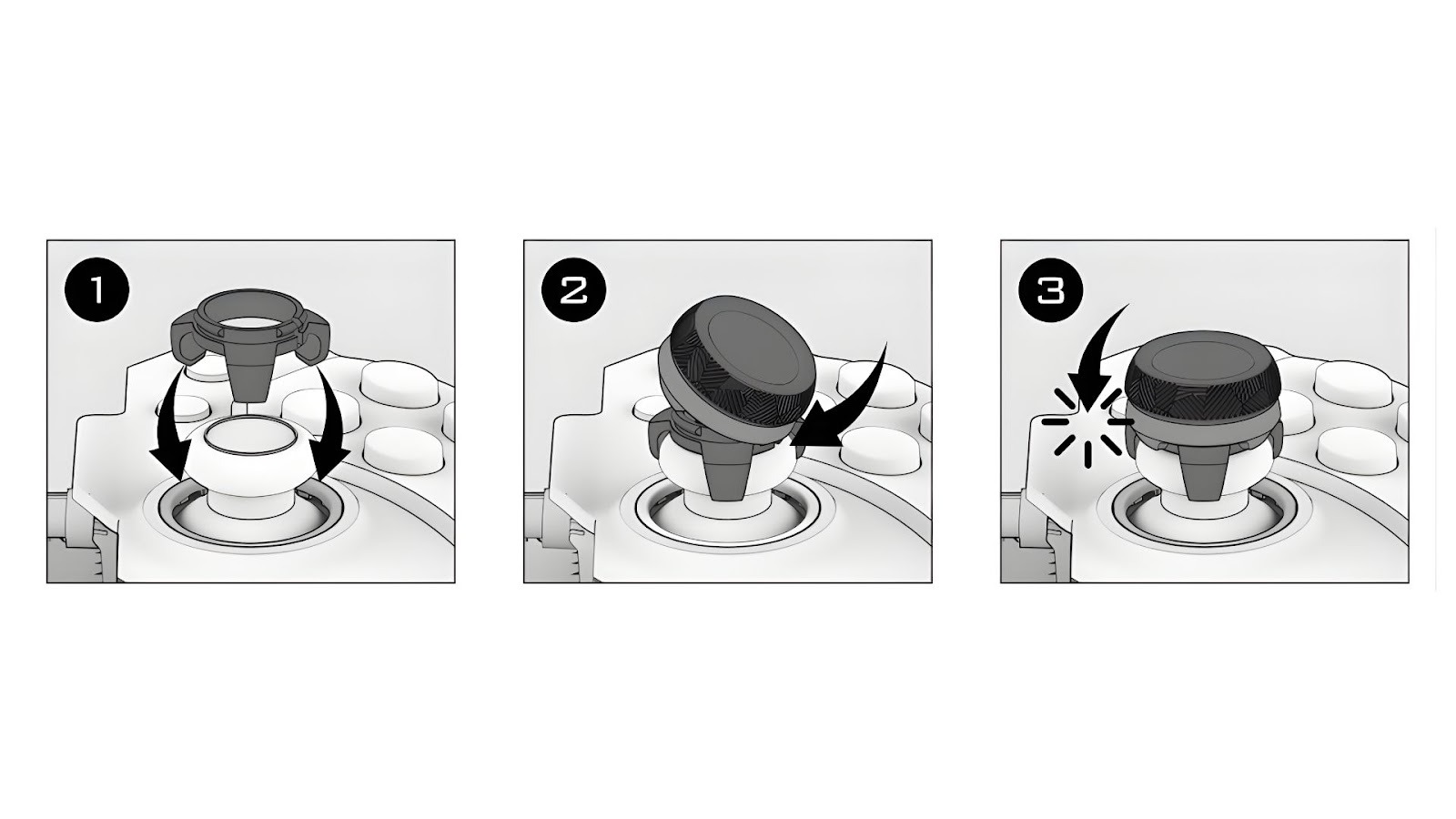
Installation Instructions
- Attach the Base Grip
- Firmly press the Ascend grip onto the analog stick
- Make sure it's centered and fully seated
- Secure the Dome
- Align the dome at an angle with the grip’s locking tooth
- Rotate the dome until it clicks into the far-side locking teeth
- Snap it securely into place
- Verify Fit
- Ensure the dome is fully seated before gameplay begins
- Adjust as needed for optimal comfort and precision
Safety & Use Guidelines
- Contains small parts – keep out of reach of children
- Do not expose to fire, water, or extreme temperatures
- Replace immediately if damaged, cracked, or worn
- Do not force domes onto incompatible analog sticks
ELO Shield™ 2-Year Limited Warranty
Your Vagabond is backed by our ELO Shield Core Warranty — 2 years of protection against defects in materials and workmanship under normal use.
What’s Covered
- Manufacturing defects
- Functional failures during normal use
What’s Not Covered
- Damage from accidents, misuse, or tampering
- Cosmetic wear and tear (scratches, etc.)
- Unauthorized modifications or repairs
Warranty Registration
To activate your warranty:
- Open the ELO Unleashed App
- Go to Product Registration
- Enter your serial number
- Upload proof of purchase
Once registered, your 2-year warranty is active.
Filing a Warranty Claim
If you run into issues:
- Option 1: Submit a claim directly in the ELO Unleashed App
- Option 2: Visit www.help.eloesports.com/contact
Our team will assist you with troubleshooting and, if needed, a repair or replacement.
📝 Jurisdiction: Warranty disputes are governed by the laws of Toronto, Canada.
Shipping & Service Costs
Covered Claims
- ELO will send you a prepaid return label
- We’ll cover shipping both ways for approved warranty claims
Non-Covered Claims
If the issue is not covered (e.g., accidental damage), you’ll receive:
- A repair/replacement quote
You may be responsible for:
- Inbound shipping
- A restocking/evaluation fee (up to 15% of purchase price) if you decline the repair
Need help? Contact us at [email protected] or call +1 512-807-0031 — we’ve got your back.